Back to My Work

Legal Indemnity CRM System

A complete redesign of a complex underwriting and customer management system used across multiple teams, built to modernise workflows, visual clarity, and operational efficiency.

Role Lead UX/UI Designer
Client Countrywide Legal Indemnities
Product Type Internal Enterprise CRM System

Project Overview

The CRM system at Countrywide Legal Indemnities served as the central hub for managing customers, policies, enquiries, audits, underwriting details, documents, and claims across the organization. This comprehensive platform touched every operational workflow—from initial customer enquiry through policy issuance, premium calculation, document management, and claim resolution.

However, the legacy interface was fragmented and visually inconsistent, with information scattered across disconnected screens using outdated design patterns. Staff struggled with cluttered layouts, unclear navigation hierarchies, and unpredictable information placement. The challenge was to create a modern, intuitive, modular interface that could support multiple user roles while maintaining the complex functionality the business depended on.

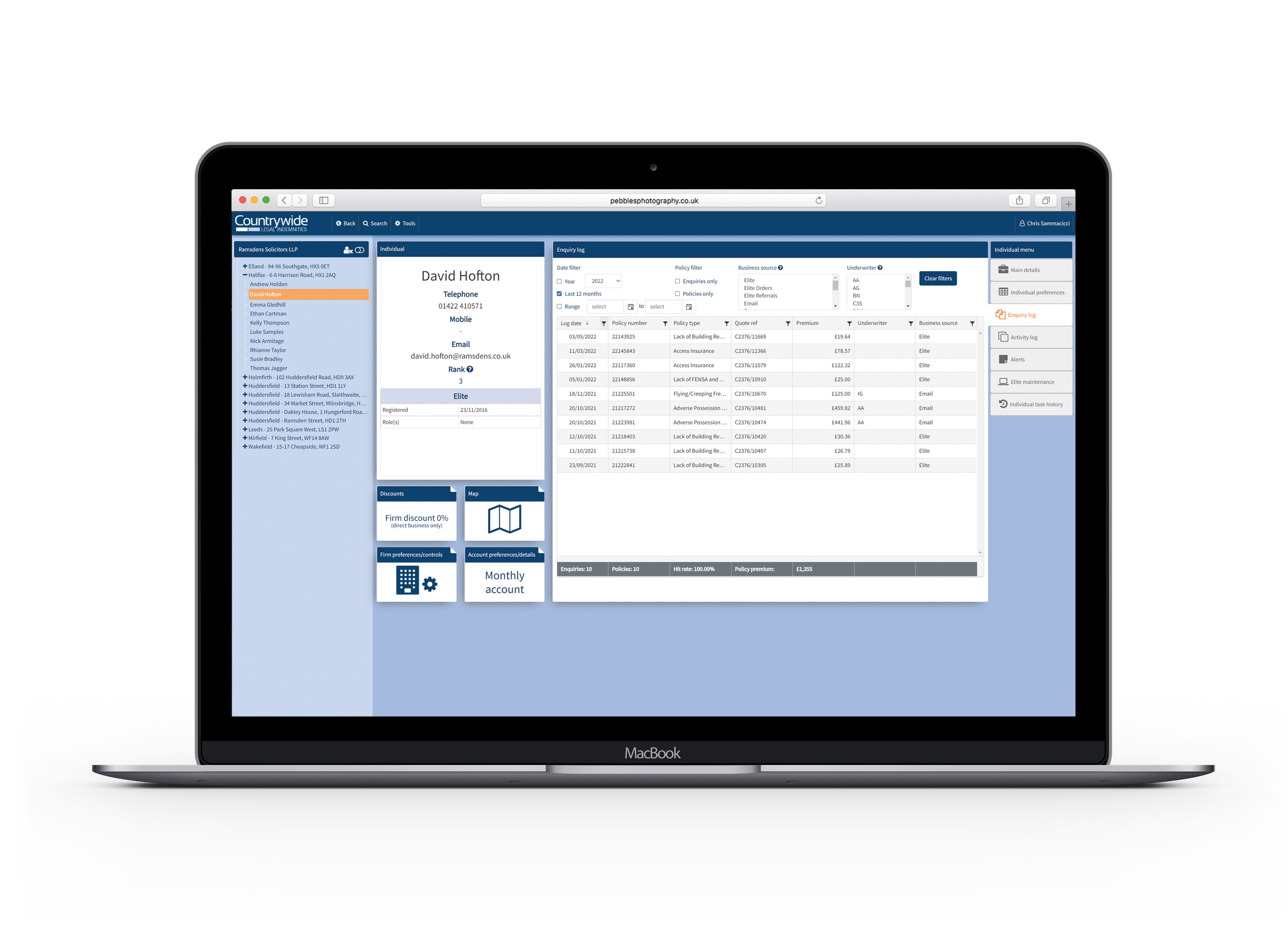
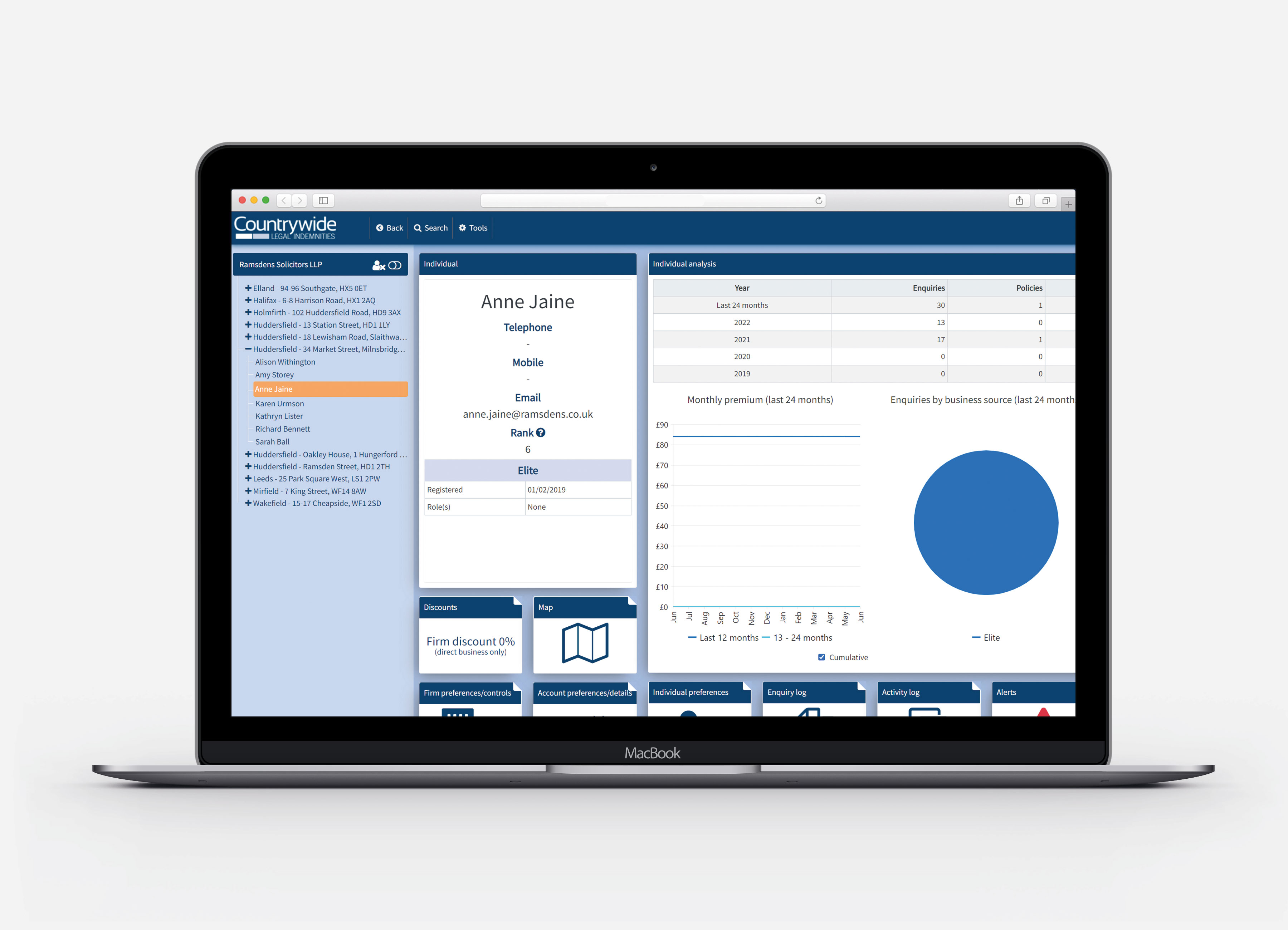
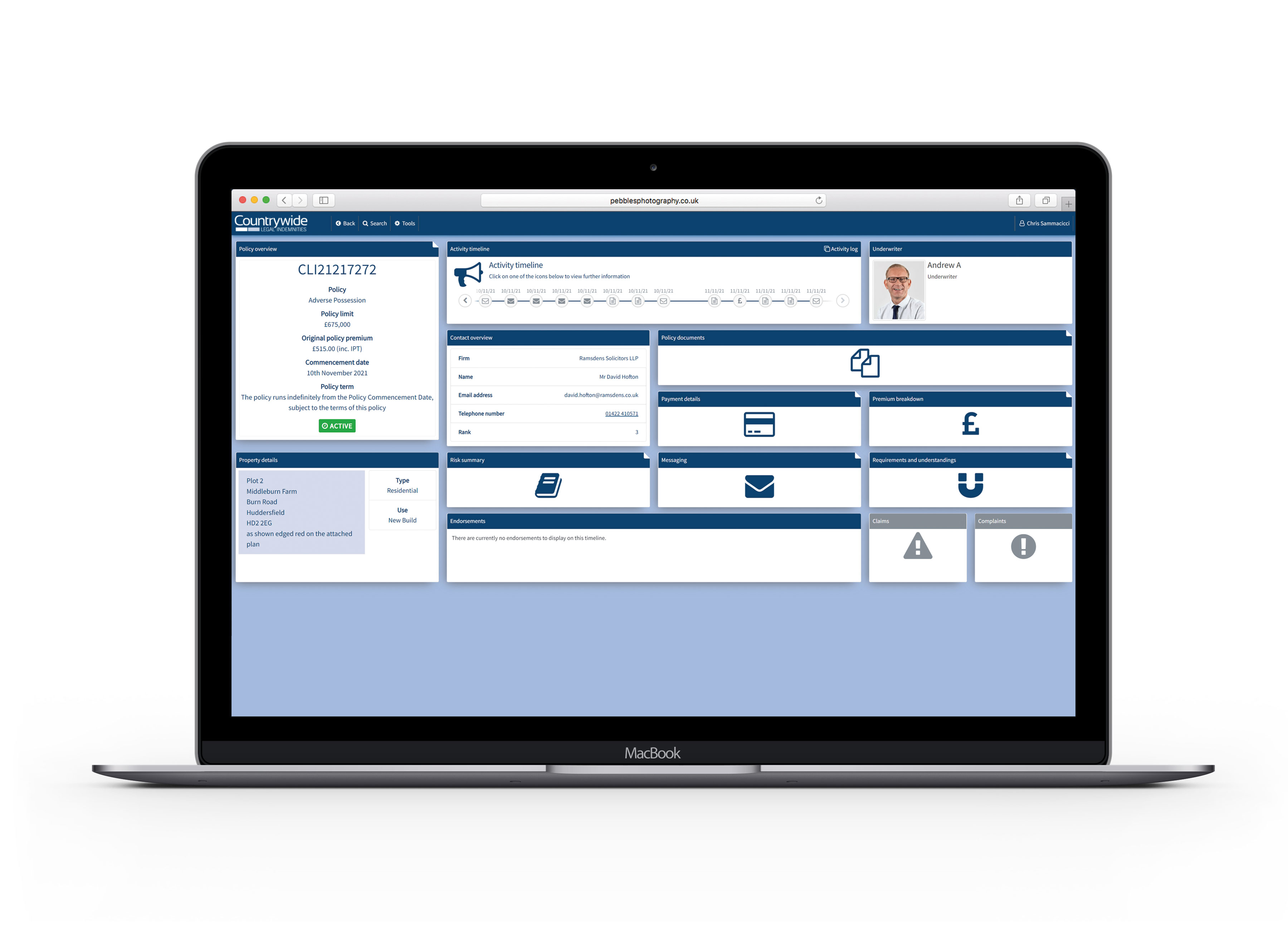
The redesigned system includes policy overview dashboards, comprehensive customer profiles, enquiry management logs, activity timelines, underwriting summaries, premium breakdowns with clear calculations, document libraries, and detailed activity logs—all unified under a consistent, scalable design system.
Context & Problem

The legal indemnity insurance industry operates in a highly regulated environment where clear, reliable, and auditable data is not optional—it's essential for compliance, risk management, and operational integrity. Every decision an underwriter makes must be traceable, every customer interaction documented, and every premium calculation defensible.

The old CRM system had evolved organically over years, resulting in inconsistent page layouts, poor navigation structures, and no clear visual hierarchy to guide users through complex tasks. Critical information was often buried several clicks deep or scattered across multiple screens. Staff frequently struggled to find key policy details, customer history, or underwriting notes quickly, leading to increased time spent on routine tasks and higher error rates.

New employees faced steep learning curves, with training taking weeks instead of days. Underwriting workflows were particularly impacted—slow screen loads, cluttered interfaces, and unclear status indicators made decision-making unnecessarily difficult. The system desperately needed modernization to support the business's growth ambitions and improve operational efficiency.

Users & Roles

The CRM served multiple internal user groups, each with distinct needs and workflows:

Each role required fast access to structured information with minimal friction. The redesign needed to accommodate these diverse needs while maintaining a consistent user experience across all touchpoints.

Business Goals & Objectives

My Role & Responsibilities

Challenges

Process

1. Stakeholder Interviews & Workflow Mapping

Conducted extensive interviews with underwriters, customer service staff, claims processors, and managers to understand their daily workflows, pain points, and priorities. Mapped current processes to identify inefficiencies, bottlenecks, and opportunities for improvement.

2. Screen Audits & User Task Analysis

Systematically reviewed every screen in the existing CRM, documenting inconsistencies, usability issues, and common user tasks. Analyzed how information was structured and where users encountered friction. Identified patterns that worked well and antipatterns to eliminate.

3. Wireframing Core Templates

Created wireframe templates for key page types: customer profiles, policy overviews, enquiry logs, underwriting screens, and document libraries. Established consistent layouts, navigation patterns, and information hierarchies that could scale across the entire system.

4. Designing Modular Reusable Cards

Developed a library of modular components—information cards, data tables, status badges, timeline elements, and action buttons—that could be combined flexibly to create different screens while maintaining consistency. This approach dramatically reduced design and development time for new features.

5. Prototyping Journey Flows

Built interactive prototypes showing complete user journeys: from receiving an enquiry through underwriting assessment to policy issuance. These prototypes helped stakeholders visualize the new system and provided developers with clear implementation targets.

6. Iterating Based on Underwriting Team Feedback

Worked closely with the underwriting team—the system's power users—to refine designs based on their feedback. Made iterative improvements to information density, navigation patterns, and keyboard shortcuts to optimize their workflows.

7. Delivering Design System Components

Created a comprehensive design system documentation covering all UI components, patterns, spacing rules, color usage, and interaction behaviors. This ensured consistency as new features were added and enabled faster development of future enhancements.

8. Supporting Development Handoff

Provided ongoing design support during development, answering questions, clarifying edge cases, reviewing builds, and making adjustments based on technical constraints or implementation realities.

Key Features

Underwriting Activity Timeline

Consolidated Customer Profile

Streamlined Policy Overview

Advanced Search & Filtering

Risk Summary Module

Document Management Tiles

Contact Overview Blocks

Modular Card-Based Layout

Alerts & Claims Modules

Cross-Navigation System

UX Improvements

UI Design System

A comprehensive design system was developed to ensure consistency across the entire CRM platform:

Workflow Enhancements

Outcomes & Impact

The CRM redesign delivered substantial improvements across all operational metrics:

Gallery / Visual Highlights

Back to My Work